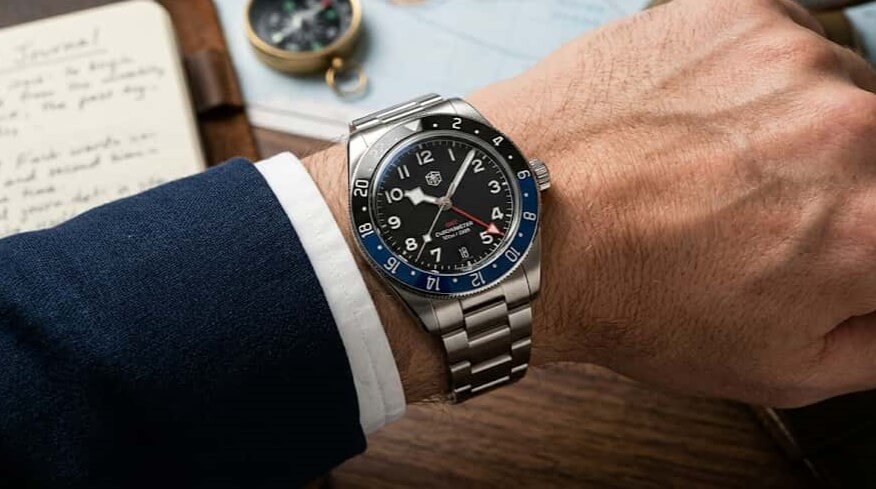
What Does GMT Mean?
GMT stands for Greenwich Mean Time, and a GMT watch is a timepiece designed to display two time zones at once on a single dial. Instead of resetting your entire watch when you travel or need to track a distant time zone, the watch lets you see your local time and a reference time simultaneously—like having a dual lens for time.
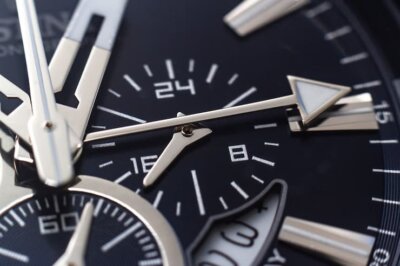
On a watch, GMT refers to a specific complication (an extra feature beyond basic timekeeping) that uses a fourth hand—called the GMT hand or 24-hour hand—to track a second time zone while your main hour hand shows your local time. This means you glance at one dial and instantly read where you are and where you need to be, time-wise.
Here is what makes this timepiece unique:
- A fourth hand (the GMT hand) that rotates once every 24 hours
- A 24-hour reference scale printed on the bezel or dial
- The ability to display two time zones without resetting the watch
Why does this matter? Imagine you are in New York but need to join a call with your team in London. You do not have to constantly do mental math or reset your watch. Your GMT hand shows London time; your hour hand shows New York time. Both are always visible, always accurate.
A common misunderstanding is that GMT is a reference time you must always use. In reality, the GMT hand can track any second region you choose—your home city, a client’s location, or anywhere else that matters to you. The term GMT stuck around in watch terminology even though modern timekeeping now uses Coordinated Universal Time (UTC), a more precise atomic standard. For practical watch purposes, GMT and UTC represent the same reference time.
Next, we will explore the historical roots of this function and why watches adopted this feature in the first place.
A Brief History: From 1884 to Modern Aviation
Before standardized timekeeping, the world operated on local solar time. Every town kept its own time based on the sun’s position, which made sense for daily life but created chaos for railways, ships, and commerce. When it was noon in London, it might be 11:47 a.m. in Bristol just 100 miles away. This fragmentation became untenable as transportation and communication networks expanded across continents.
The solution emerged at the International Meridian Conference in 1884, held at the Royal Observatory in Greenwich, London. Representatives from 25 nations agreed to divide the Earth into 24 time zones, each one hour apart, all measured from a single reference point: the Prime Meridian (0° longitude), which runs through Greenwich. This line became the anchor for Greenwich Mean Time (GMT)—the zero hour from which all other time zones are calculated by adding or subtracting hours as you move east or west. Suddenly, a merchant in New York, a sailor in Hong Kong, and a railway clerk in Berlin could all coordinate using a single, universal reference.
For the next 70 years, GMT remained the standard for global timekeeping. In 1972, Coordinated Universal Time (UTC) replaced GMT as the scientific atomic standard, though GMT terminology persists in watches and represents the same reference time. A new problem emerged with the growth of commercial aviation. Pilots crossing multiple zones needed to track both their local time at their destination and a constant reference point—ideally their home base or a neutral standard. Checking the time in New York while flying to Tokyo, with only a 12-hour dial, created ambiguity: was it 3 a.m. or 3 p.m. at home? The consequences of that confusion could be serious.
In 1954, Rolex introduced the GMT-Master, the first wristwatch designed specifically to solve this problem for Pan Am pilots flying intercontinental routes. The watch featured a fourth hand that moved at half the speed of the hour hand, completing one full rotation every 24 hours instead of two. Paired with a rotating 24-hour bezel, this allowed a pilot to set one region’s time on the bezel and read a second region’s time using the GMT hand, all at a glance. Pan Am pilots could now track both their local time and their reference time (usually home) without mental math or confusion about day and night.
While aviation was the catalyst, the design proved useful far beyond the cockpit. This complication was refined over decades, and by the late 20th century, travelers, global teams, and anyone juggling multiple regions found the same value. The underlying principle—a 24-hour reference scale paired with an additional hand—remains the foundation of every such watch sold today, though designs now range from pilot-focused models to more accessible, everyday alternatives.
Next, we’ll explore what makes this timepiece tick mechanically and why a 24-hour hand is fundamentally different from a second 12-hour dial.
How Does a GMT Watch Work? The Mechanics
A standard analog watch keeps time using three hands: an hour hand that completes one full rotation every 12 hours, a minute hand that circles the dial once per hour, and a seconds hand for precise timing. This type of watch adds a fourth hand, called the GMT hand (also known as the 24-hour hand), which operates on an entirely different schedule. This extra hand is the key to the watch’s ability to display two time zones simultaneously on a single dial.
The fundamental principle lies in the different rotation speeds of these hands. While your standard hour hand spins around the dial twice in a 24-hour period (once every 12 hours), the GMT hand takes a full 24 hours to complete a single rotation. This half-speed design is not arbitrary; it exists for a specific reason. Because the GMT hand moves at half the speed of the hour hand, it naturally aligns with a 24-hour reference scale printed on the watch’s bezel or dial. This alignment allows the GMT hand to indicate the correct hour on a 24-hour timeline, making it immediately obvious whether it is morning or evening in your reference time zone without any mental calculation.
To understand this better, imagine two separate clocks ticking inside one watch case. One clock (represented by the standard hour hand) operates on a 12-hour cycle, showing your local time as you normally read it. The other clock (the GMT hand) operates on a 24-hour cycle, showing a second region on a military-style 24-hour scale. Because they spin at different speeds and are driven by separate mechanical pathways within the movement, they do not interfere with each other. You can adjust one without disturbing the other, depending on whether your watch has a static or independent GMT hand design (more on that distinction later).
From a mechanical standpoint, this dual-hand functionality requires added complexity inside the watch movement. A standard watch movement uses a series of gears to drive the hour, minute, and seconds hands. This type of movement includes an additional cog or gear that rotates at half the speed of the standard hour-hand gear. This extra cog is integrated into the existing movement architecture and drives the GMT hand independently. Some watches also employ a brief “dual power system” concept, meaning one power train regulates the local time hands while a second regulates the GMT hand, but for beginners, it is sufficient to know that the GMT hand is mechanically separated from the hour hand so that both can operate without conflict.
The result is a timepiece that displays two different times at once: your local time (read from the hour and minute hands against the 12-hour dial) and your reference time zone (read from the GMT hand against the 24-hour reference scale). This mechanical feat represents a significant advance in watchmaking, as it solved a real problem for travelers and professionals who needed to track multiple regions without carrying multiple watches.
The Anatomy of a GMT Dial
At the center of the dial, you’ll find three standard hands: the hour hand (short and thick), the minute hand (longer and thinner), and the seconds hand (very thin or sometimes in a subdial). This timepiece adds a fourth hand, the GMT hand, typically styled distinctly—perhaps arrow-shaped, bright blue, or orange—so it stands out visually from the others.
Around the edge of the dial (on a rotating bezel or printed on the dial itself) sits the 24-hour reference scale, numbered 0 to 24 or 1 to 24. When you glance at the watch, your eye naturally reads the hour hand first, then follows the distinct GMT hand to this reference scale. The two hands occupy the same center point but point in different directions because they are mechanically independent.
| Component | Rotation Speed | Rotation Time | Purpose |
|---|---|---|---|
| 12-hour hour hand | Twice per day | 12 hours per rotation | Displays local time on the main 12-hour dial |
| 24-hour GMT hand | Once per day | 24 hours per rotation | Displays reference time on the 24-hour scale |
Next, we will explore how the 24-hour bezel and scale make it easy to read multiple time zones and how the bezel’s rotation allows you to track even more regions if needed.
The 24-Hour Bezel & Scale: Reading Two Time Zones
The 24-hour bezel or scale is the reference map that transforms the GMT hand from a confusing extra pointer into a readable second-time-zone display. While the GMT hand rotates once every 24 hours, it is the numbered scale around the watch face that tells you what hour it represents in your chosen second region.
Understanding the 24-Hour Bezel and Scale
A 24-hour bezel is a rotating ring that sits on the outer edge of the watch case, marked with numbers from 0 to 24 (or sometimes 1 to 24). These numbers correspond to each hour of a complete day. On some watches, this scale is printed directly on the dial instead of on a rotating bezel; in those cases, it is called a fixed 24-hour scale. Either way, the purpose is identical: to give the GMT hand a reference framework.
Many 24-hour bezels are color-coded, typically split into two halves. One half is often black or dark, representing nighttime hours (roughly 18:00 to 06:00), while the other is white or bright, representing daytime (06:00 to 18:00). This color division prevents the common beginner mistake of misreading AM and PM at a glance. For example, if the GMT hand points to the 6 on the reference scale during the day, the scale’s color coding instantly confirms that this represents 6:00 AM (early morning), not 6:00 PM.
Here is how the bezel or scale typically appears on the watch: numbers 0 through 24 are printed or engraved around the perimeter, spaced evenly like hour markers on a traditional 12-hour dial. The GMT hand (which looks distinct from the main hour hand, often styled as an arrow or in a contrasting color) points to one of these numbers. That number is the hour in your reference region, read in 24-hour format.
Rotating Bezel vs. Fixed Scale
The key difference between a rotating bezel and a fixed scale is flexibility. A rotating bezel can be turned by hand to align the scale with any region you choose. A fixed 24-hour scale on the dial cannot be moved; it is permanently printed on the watch face. Both approaches work; the rotating bezel simply offers one extra layer of customization, particularly useful for travelers managing multiple zones on the fly.
When you rotate the bezel, you are not changing the watch’s actual timekeeping. The bezel rotation is purely visual: it shifts where the 24-hour numbers align relative to the GMT hand so that you can easily read a different reference time. The GMT hand itself continues to keep accurate time; the bezel is just a tool to help you interpret it.
How to Read the GMT Hand Using the 24-Hour Scale
Reading the GMT hand is straightforward once you understand the reference scale. Follow these steps:
- Look at the GMT hand (the extra hand on your watch, often arrow-shaped or colored differently from the main hands).
- See which number on the 24-hour scale the GMT hand is pointing to.
- That number is the hour in your reference region, in 24-hour format. For example, if the GMT hand points to 14, it is 14:00 (2:00 PM) in that location.
- For basic two-region use, leave the bezel in its neutral position. Advanced users can rotate the bezel to track a third region (see the “Tracking a Third Zone” section).
This is why the reference scale matters so much. A traditional 12-hour dial (like on a standard watch) repeats every 12 hours, making it ambiguous: a hand pointing to 6 could mean 6:00 AM or 6:00 PM. The 24-hour scale eliminates this confusion. By showing all 24 hours in one full rotation, the scale makes it impossible to confuse morning and evening. If the GMT hand points to 6 on the 24-hour scale, it unambiguously represents 6:00 AM. If it points to 18, it is 6:00 PM.
Using the Rotating Bezel to Set a Second Time Zone
If your watch has a rotating bezel, here is how to use it to align the scale with a different region:
- Identify the GMT hand and the current number it is pointing to on the 24-hour scale. This is your reference time.
- Determine the offset of your second region from your reference. For example, if your reference is GMT +0 and you want to track Hong Kong time (GMT +8), the offset is +8 hours.
- Rotate the bezel clockwise or counterclockwise so that the number on the scale aligns with the offset. Rotating the bezel 8 positions clockwise will shift the scale so that a time 8 hours ahead now reads correctly under the GMT hand.
- Read the GMT hand against the newly aligned scale. It will now display the time in your chosen second region.
The bezel can usually be rotated in both directions, giving you full flexibility to track time zones east or west of your primary reference.
Why 0–24 Instead of 12–12?
A standard watch dial shows 12 hours and repeats twice in a 24-hour period. A GMT scale shows all 24 hours in a single rotation around the watch. This design choice is crucial for clarity: it ensures that each hour of the day has a unique position on the scale, preventing AM/PM ambiguity. When you glance at a watch like this, the 24-hour scale lets you instantly determine not just the hour but also whether it is morning, afternoon, or night in your reference region, without any mental calculation.
Next, we will explore how to practically set and read your watch, including step-by-step instructions for different GMT hand designs and worked examples showing real time zones in action.
How to Read and Set a GMT Watch (Practical Guide)
Whether your watch has a static or independent GMT hand, the reading process is the same; the difference lies in how you set the watch for travel.
Reading Two Time Zones at a Glance
To read your watch, follow these two simple steps:
- Read your local time from the standard 12-hour hour hand (the shorter hand pointing to the 12-hour dial indices).
- Read the reference region by looking at where the GMT hand points on the 24-hour scale (the rotating bezel or fixed scale around the dial edge).
For example, imagine it is 3 PM in New York. Your hour hand points to 3 on the dial. At that same moment, the GMT hand points to 8 on the 24-hour scale. On a 24-hour scale, 8 represents 8 AM. Since New York is GMT-5, 3 PM New York time plus 5 hours equals 8 PM GMT. Your watch shows both instantly.
Common Beginner Mistake: The GMT Hand at Noon
A common beginner confusion: when it is 12 noon GMT, why does the GMT hand point to 12 on the 24-hour bezel instead of 6? The answer is simple once you understand the 24-hour scale layout. On a 24-hour bezel or scale, 0 (or 24) marks midnight at the top, 6 marks 6 AM at the quarter-mark, 12 marks noon at the halfway point, and 18 marks 6 PM at the three-quarter mark. When the GMT hand points to the 12 position on this scale, it is indicating noon GMT. You can verify this: if it is noon and the GMT hand points to 12, and you know the 24-hour scale runs from 0 to 24 around the dial, the 12 position represents 12 hours into the day (noon).
Setting a Static GMT Hand
A static (anchored) GMT hand moves in tandem with the hour hand. When you adjust the local time by moving the hour hand, the GMT hand moves proportionally. This design is simpler mechanically but requires more bezel rotation for travel. Here is how to set it:
- Decide on your reference region (typically your home location). Set the GMT hand to that time on the 24-hour scale. If your home is GMT (London), point the GMT hand to 0 or 24 on the bezel. If your home is New York (GMT-5), point the GMT hand to 19 on the 24-hour scale (because 24 minus 5 equals 19, representing 7 PM when it is midnight GMT).
- Rotate the bezel so the number matching your reference region sits at the top (where 12 would be on a standard watch). For example, GMT+0 → rotate until 0 or 24 sits at the top; GMT-5 (New York) → rotate until 19 sits at the top.
- Set the hour hand to your current local time by pulling the crown and turning it until the hour hand points to the current hour on the 12-hour dial.
- Push the crown back in. Your watch now displays local time on the hour hand and your reference region on the GMT hand.
- If you need to track a third region, rotate the bezel again without adjusting the hands. The GMT hand will point to a different location on the newly aligned scale.
Setting an Independent GMT Hand
An independent GMT hand can be adjusted separately from the hour hand. This is the traveler-friendly design because you can set your local time without moving your reference time. Here is the workflow:
- Set the GMT hand to your home region on the 24-hour scale. If you are based in London (GMT +0), point the GMT hand to 0 or 24. If you are based in Dubai (GMT +4), point the GMT hand to 4 on the 24-hour scale.
- Set the hour hand to your current local time at your destination. For example, if you are in Hong Kong (GMT +8) and it is 9 PM, turn the hour hand to point to 9 on the dial.
- The bezel stays in its standard position (0 or 24 at the top) unless you want to reference a third region. Your watch now shows: local time (9 PM) on the hour hand, and your home region (or reference time) on the GMT hand.
- If you move to another region, simply adjust the hour hand to the new local time. The GMT hand does not move, so your reference time remains constant—a huge convenience for travelers.
Setting a Static vs. Independent Checklist
Use this checklist to confirm you have set your watch correctly based on your design type:
Static (Anchored) GMT Hand:
- Reference region chosen (e.g., GMT, London, New York)
- Bezel rotated so that the GMT hand points to the reference time on the 24-hour scale
- Hour hand set to the current local time
- GMT hand moves with the hour hand (no separate adjustment needed)
Independent GMT Hand:
- GMT hand set to your home or reference region on the 24-hour scale
- Hour hand set to the current local time at your location
- GMT hand remains constant when local time is adjusted
- Bezel available for a third region (optional rotation)
Next, we will explore the key differences between static and independent GMT hand designs and when each type is most useful.
Static vs. Independent GMT Hands: What’s the Difference?
Not all watches work the same way. The key difference lies in how the GMT hand behaves when you adjust your watch to a new region. Understanding this distinction is crucial because it directly affects how convenient your watch is for travel.
Static (Anchored) GMT Hand
A static GMT hand is mechanically linked to your main hour hand. When you adjust your local time by turning the crown, the GMT hand moves with it automatically. This design is simpler and was common in earlier watches. The trade-off is that you cannot independently set the two time zones without affecting each other.
With a static GMT hand, adjusting local time for a new region will shift your reference time display as well. To keep a second region visible, you rely on rotating the bezel rather than adjusting the hands separately.
Independent GMT Hand
An independent GMT hand operates on a separate system within the watch movement. It can be adjusted without moving your main hour hand, or vice versa. This design is more complex mechanically but far more practical for travelers. You can set your local hour hand to your current region and keep your GMT hand pointing to your home time (or any other reference region) unchanged.
Scenario: Pilot vs. Business Traveler
Consider two travelers leaving New York (GMT-5) for London (GMT+0):
A pilot with a static GMT hand keeps GMT displayed at all times as the constant reference. When arriving in London, the pilot adjusts local time forward by 5 hours. The GMT hand moves with it, staying locked to GMT. The watch remains aligned with aviation protocols where GMT is the unchanging anchor. The pilot never touches the bezel—GMT is the anchor and must stay visible.
A business traveler with an independent design keeps the GMT hand set to New York time (home reference). Upon arrival in London, the traveler adjusts only the local hour hand to 5 hours ahead without disturbing the GMT hand. At a glance, they see both London time and New York time without bezel manipulation. For daily travel between two regions, they rely on the independent GMT hand so the bezel doesn’t need constant adjustment.
| Mechanism | Setup | Pros | Cons | Best for |
|---|---|---|---|---|
| Static (anchored) GMT hand | GMT hand moves when you adjust hour hand | Simpler design, lower cost, aligns with pure GMT reference | Must use bezel rotation to track a second region independently; less flexible for frequent time-zone changes | Pilots, GMT purists, single-reference workflows |
| Independent GMT hand | GMT hand adjusts separately from hour hand | Adjust local time without affecting home time display; ideal for multi-region travel; no bezel workaround needed | More complex movement, typically more expensive | Frequent travelers, remote workers, global business professionals |
Neither design is universally “better”—the choice depends on your primary use case. Pilots and those who prioritize GMT as a fixed reference typically prefer static designs. Travelers who jump between time zones and want to see home and local time simultaneously at a glance benefit from independent designs.
Next, we’ll explore who benefits most from owning this watch and examine real-world use cases beyond aviation.
Who Wears a GMT Watch? Use Cases & Personas
This timepiece is useful for anyone who regularly needs to know the time in two places simultaneously. While such watches were originally designed for pilots navigating international flights, modern life has created many more reasons to own one. Whether you work across regions, travel frequently, or maintain close connections with people abroad, a watch like this solves a real problem: glancing at your wrist to see both your local time and a reference region without pulling out your phone or doing mental math.
Who Uses These Watches
- Pilots and aviation crew: tracking Greenwich Mean Time or a reference region alongside local airport time for safety and coordination.
- Frequent business travelers: keeping one eye on home time while managing meetings and appointments in a new region.
- Remote workers and global teams: coordinating with colleagues across multiple time zones without switching between phone apps or web tools.
- Military and maritime professionals: maintaining precise time references for navigation and cross-region operations.
- Digital nomads and expats: constantly moving between time zones and needing instant awareness of both local and home time.
- Parents and family: quickly checking what time it is for a loved one in another region without calculation.
- Event coordinators: managing schedules and deadlines that span multiple time zones simultaneously.
- Watch collectors: appreciating this type as a mechanical marvel that represents a significant engineering achievement.
Office GMT vs. Traveler GMT
If you work in an office and rarely leave your home location but coordinate with global teams, this watch keeps your home time stable while you work. If you travel constantly, you want to reset local time at each destination while your GMT hand anchors to home. These are different workflows, but the same watch can serve both depending on how you set it.
The table below illustrates why each user type benefits:
| User Type | Why It Helps |
|---|---|
| Pilot | Instant reference to standard time zone; reduces confusion during international routes; required for many aviation operations. |
| Business traveler | See home time and local time at a glance; avoid missed calls or scheduled meetings; no app switching needed. |
| Remote worker | Coordinate calls and deadlines across 2–3 time zones instantly; reduces mental math fatigue during the workday. |
| Military or maritime professional | Maintain precise reference time for operations, navigation, and coordination across regions. |
| Digital nomad | Track both local time in your current location and time in your home country or key base city as you move. |
| Parent with family abroad | Quick check of what time it is for relatives or children in another region; plan calls without calculation. |
| Event coordinator | Manage simultaneous deadlines, registrations, and event starts across multiple time zones on a single glance. |
| Collector | Appreciation of mechanical complexity, engineering heritage, and iconic design (e.g., the 1954 Rolex GMT-Master origin story). |
Real-World Scenarios
Office GMT Scenario: Sarah works in New York but manages a customer in Hong Kong. She sets her GMT hand to New York time (her office reference) and her hour hand to Hong Kong time (where she is attending a virtual meeting). When she returns to New York, her GMT hand already shows the correct New York time; she simply adjusts the hour hand to local time, and the watch is reset without touching the GMT reference. No resetting required.
Traveler GMT Scenario: Marcus travels constantly for business. He sets his GMT hand to his home time (London) once and leaves it there. As he flies to different cities—Dubai, Singapore, Los Angeles—he simply adjusts the hour hand to each new local time. At any moment, one glance tells him both what time it is locally and what time it is at home. His GMT hand never moves.
Why a Watch Still Matters vs. Your Phone
You may wonder: if your smartphone already displays multiple time zones in the settings, why wear this kind of watch? The answer lies in immediacy and reliability. A glance at your wrist takes one second; unlocking your phone takes longer and breaks focus during a meeting or conversation. This watch also requires no battery charge, operates independently without internet connectivity or software updates, and remains functional indefinitely as long as the watch keeps accurate time. For professionals in aviation, maritime work, or high-stress environments where a split-second time reference can matter, and for anyone who values a mechanical tool over a digital one, this watch provides peace of mind and practical speed.
Next, we will explore the difference between this type and dual-time watches, which are often confused but work differently.
GMT vs. Dual-Time Watches: What’s the Difference?
A watch with GMT function and a dual-time watch are often confused because both display two time zones on a single dial. However, they work differently and serve different purposes. Understanding the distinction will help you choose the right tool for your needs and avoid purchasing a watch that does not deliver the clarity you expect.
What Is a Dual-Time Watch?
A dual-time watch displays a second region using one of two methods. The most common approach adds a subdial (a small secondary dial) that shows a second time in 12-hour format. Some dual-time watches use a second hour hand instead, which rotates at a different speed than the main hour hand. In both cases, the wearer manually adjusts the subdial or second hand to match a second region.
The challenge with many dual-time designs is that they rely on a 12-hour format for the second region. This means you see numbers 1 through 12 repeated, just as on a standard watch face. At a glance, you cannot easily tell whether the subdial or second hand is pointing to, say, 3 o’clock in the morning or 3 o’clock in the afternoon.
What Is a GMT Watch?
A watch with GMT function (Greenwich Mean Time) is a specialized form of dual-time display built around a 24-hour reference scale. It uses a fourth hand—the GMT hand (also called the 24-hour hand)—that completes one full rotation around the dial every 24 hours, not every 12 hours like the hour hand. Paired with this hand is a 24-hour scale, either on a rotating bezel or printed directly onto the dial face.
The 24-hour scale runs from 0 to 24 (or sometimes 1 to 24), with intermediate markings. This format allows you to read the GMT hand directly against this scale and know immediately whether it is daytime or nighttime in your reference region.
The Critical Difference: AM/PM Clarity
The fundamental advantage of a GMT-function watch over a standard dual-time watch is AM/PM clarity. When you glance at this type of watch, the GMT hand and 24-hour scale tell you definitively whether a given time is morning, afternoon, or night. For example, if the GMT hand points to 6 on a 24-hour scale (typically marked in the lower quarter), it unambiguously shows 6 a.m. If it points to 18, it is 6 p.m. No guesswork.
On a traditional dual-time watch with a 12-hour subdial or second hour hand, a subdial pointing to 6 could mean either 6 a.m. or 6 p.m. You must cross-reference it with the main dial or use context clues to disambiguate. For travelers, pilots, and remote workers managing time across many regions, this ambiguity can lead to scheduling errors and confusion.
Understanding the “True GMT” Criteria
Not every watch called a GMT watch meets the technical definition. A true GMT watch must have two essential components: a 24-hour (GMT) hand and a 24-hour reference scale. The bezel does not have to be rotating; the scale can be fixed on the dial. However, both the hand and the scale must be present for the watch to deliver the AM/PM clarity that defines this function.
Some watches marketed as GMT models may have only a 24-hour hand without a corresponding 24-hour scale, or vice versa. These do not offer the same clarity and should be evaluated carefully if you depend on unambiguous time-region reading.
The following table compares the key technical and practical differences:
| Feature | GMT Watch | Dual-Time Watch |
|---|---|---|
| Hand Count for Second Time Zone | One dedicated 24-hour hand (GMT hand / fourth hand) | Often one second hour hand or subdial; typically 12-hour format |
| Scale Format | 24-hour scale (0–24) on bezel or dial | 12-hour scale on subdial or main dial |
| AM/PM Clarity | Instant: the 24-hour scale makes day vs. night obvious at a glance | Ambiguous: a 12-hour subdial pointing to 6 could mean 6 a.m. or 6 p.m. |
| Second Region Readability | Direct and unambiguous; GMT hand aligns with the 24-hour scale | Requires interpretation and cross-checking with main dial or context |
Identifying a True GMT Watch: Quick Checklist
If you are examining a watch and want to know whether it is a true GMT or simply a dual-time model, use this simple checklist:
- Does the watch have a fourth hand that is distinctly styled (often with an arrow or contrasting color) and moves more slowly than the hour hand?
- Is there a 24-hour scale visible on the bezel (rotating or fixed) or printed on the dial itself, numbered from 0 to 24?
- Can you point the GMT hand at a time on the 24-hour scale and immediately tell whether it is morning or evening without guessing?
- Does the watch have only a second 12-hour hour hand or subdial, with no 24-hour scale visible? If yes, it is a dual-time watch, not a true GMT watch.
If you answered yes to the first three questions and no to the fourth, you have a true GMT watch. This distinction matters because many travelers and global professionals assume any watch labeled “GMT” or “dual time” will solve their time-zone coordination problems. In reality, only a true GMT watch—with both a 24-hour hand and a 24-hour reference scale—provides the instant, unmistakable AM/PM clarity that makes coordinating across time zones quick and reliable.
Next, we will explore how to track a third region on compatible GMT watches using bezel rotation.
Tracking a Third Time Zone (Optional)
This advanced technique shows how to read three time zones on one GMT watch, using the GMT hand together with a rotating 24-hour bezel.
Not every watch can do this. You need both a rotating 24-hour bezel and an independent GMT hand for the method below to work smoothly.
What You Need Before You Start
To track a third region on a compatible watch, make sure your watch has an independent GMT hand you can move without moving the 12-hour hour hand, a rotating 24-hour bezel with a 0–24 scale around the outside of the dial, and a clear idea of three zones you want to follow: local time, reference time (second region), and a third region.
The Basic Three-Zone Concept
Conceptually, three-region tracking works like this: Use the 12-hour hour hand for local time (where you are). Use the GMT hand as reference time (second region), often home or a key business city. Use bezel rotation to offset the 24-hour scale so it lines up with a third region. Once you rotate the bezel to the third region, the bezel becomes the anchor scale for that location. The GMT hand keeps pointing to the same 24-hour “hour” of day, but you read it against the shifted bezel markings for the third region. The trade-off is that while the bezel is set to the third region, quickly reading the original reference time (second region) on a clean 0–24 scale may require rotating the bezel back to its neutral position.
Step-by-Step Checklist
Here is a simple checklist you can follow to set up three regions on a compatible watch:
- Set the GMT hand to your chosen reference time (second region) using the 24-hour scale, with the bezel in its neutral position (triangle at 12).
- Set the 12-hour hour hand to your local time so it matches the location you are currently in.
- Decide which third region you want to track and calculate its hour difference relative to your reference time.
- Rotate the bezel to offset the 24-hour scale by that difference, turning it clockwise if the third region is behind your reference time and counterclockwise if it is ahead.
- Practice reading all three zones so you can see at a glance which hand and which scale each one uses.
Concrete Example: New York, London, and Tokyo
Imagine this setup: Reference time (second region) is New York. Local time is London. Third region is Tokyo.
New York is typically 5 hours behind London, and Tokyo is usually 9 hours ahead of London. Relative to New York, Tokyo is 14 hours ahead.
Walkthrough: Set the 12-hour hour hand so it shows London local time (for example, 10:00). With the bezel triangle at 12, set the GMT hand so it points to New York time on the 24-hour ring (for example, 05:00 on the 24-hour ring if it is 10:00 in London and 05:00 in New York). Rotate the bezel 14 hours forward (counterclockwise) so that the 14 mark on the bezel lines up where 0 (or 24) would normally sit under the GMT hand when in neutral. After this rotation, London local time still comes from the 12-hour hour hand against the regular dial markers. Tokyo time comes from reading where the GMT hand points on the rotated bezel’s 24-hour markings. New York reference time can still be interpreted, but you must mentally or visually undo the bezel offset, or briefly rotate the bezel back to neutral if you want a clean read.
Trade-Offs and When to Use Three-Zone Tracking
Three-region tracking is most useful if you regularly juggle multiple regions, such as a home office in New York, partners in London, and suppliers in Tokyo. The main trade-offs are: Extra mental effort—you must remember which bezel position is active and which city it represents. Less instant reference time reading—when the bezel is offset for the third region, the original reference time is not as clean to see at a glance. More moving parts in your routine—bumping the bezel can misalign your third-zone reading until you re-set it. If you mostly need two regions, you can leave the bezel in neutral and enjoy simple, clear reading. Three-region use is best treated as an occasional advanced tool when your schedule truly demands it.
Next, we will look at common questions about GMT watches in a focused FAQ format.
Common Questions About GMT Watches (FAQ)
Q: What does GMT mean on a watch?
A: GMT stands for Greenwich Mean Time, but on modern watches, the GMT hand can be set to track any second region you choose—your home city, a client location, or any other reference point that matters to you. The name GMT is a historical term; the function is flexible.
Q: How is this type of watch different from a regular watch?
A: A GMT watch adds a fourth hand—the GMT hand—that rotates once per 24 hours, plus a 24-hour scale, to show two time zones at once. A regular watch only has hour, minute, and second hands for local time on a 12-hour dial, without second region tracking. This extra feature provides AM/PM clarity for the reference time.
Q: How do I read a GMT watch?
A: Read local time with the 12-hour hour hand, then check the GMT hand against the 24-hour scale for your second region. If there’s a rotating bezel, align it for the reference time; for a fixed scale, the GMT hand points directly to the hour. Note that at different local times, the GMT hand will point to different positions based on the 24-hour scale.
Q: Can a GMT watch track three time zones?
A: Yes, with an independent GMT hand and rotating 24-hour bezel, you can track a third region by offsetting the bezel. Set the GMT hand to reference time, local hour hand to your location, and rotate the bezel for the third zone. Not all watches support this easily.
Q: What’s the difference between a GMT watch and a dual-time watch?
A: A true GMT watch uses a 24-hour GMT hand and scale for clear second region reading with AM/PM distinction. Dual-time watches often rely on a 12-hour subdial, which can confuse day and night. GMT provides better clarity via the full 24-hour format.
Q: Who should wear a GMT watch?
A: Frequent travelers, pilots, remote workers with global teams, or anyone tracking family abroad benefit most. Office users monitoring international markets or business professionals in different regions find it handy. It’s also great for mechanical watch enthusiasts.
Q: Why does the GMT hand point to 12 when it’s noon?
A: On a 24-hour scale, 0 (midnight) sits at the top, 6 sits at the quarter-mark (6 AM), 12 sits at the halfway point (noon), and 18 sits at the three-quarter mark (6 PM). So when it’s noon GMT, the GMT hand points to the 12 position on the 24-hour scale, not to 6. If you see the GMT hand pointing to 6, it means 6 AM in your reference region. Always cross-check the GMT hand position against the exact 24-hour scale markings to avoid confusion.
Q: Do all GMT watches have a rotating bezel?
A: No, some GMT watches use a fixed 24-hour scale on the dial instead, where the GMT hand reads directly against it. Rotating bezels allow bezel rotation to offset the scale for additional regions. Both designs track two time zones effectively.
Q: Can you use a GMT watch as a compass?
A: Yes, as a bonus feature: point the GMT hand at the sun, then the 12 o’clock marker indicates north in the Northern Hemisphere or south in the Southern Hemisphere. This is a secondary skill, not for precise navigation.
Q: What’s the difference between GMT and UTC?
A: UTC (Coordinated Universal Time) is the modern atomic time standard that replaced GMT in 1972, but they represent the same reference time in practice. GMT remains the common term in watchmaking for this function.
Q: What does “independent GMT hand” mean?
A: An independent GMT hand lets you adjust local time without moving the GMT hand, keeping your reference time steady. Static designs link them, so both shift together. This design is traveler-friendly for quick local changes.
Q: Do I need a GMT watch if I never travel?
A: Not strictly for travel, but it’s useful for remote work with global teams, staying connected with family abroad, or tracking stock markets across regions. Mechanical interest alone makes it appealing without trips.